AI chatbots vs. AI agents: what’s the difference?

by Ashley Luk
November 16, 2026 - 8 min

Related Categories
By now, most people are familiar with AI through chatbots. You send a message to a chatbot asking it for questions or advice. For instance, “can you explain the ending of ‘The Brothers Karamazov’ to me? And then recommend a breezier read for my beach trip.” The bot answers your questions, and that’s the broad extent of what it can do.
With an AI agent, however, you can say, “I’m hosting this month’s book club meeting. Send out a calendar invite to everyone with the updated address. Also, place a grocery pickup order with the ingredients I’d need to make this hors d’oeuvres recipe.”
In short: through agents, AI can now do a whole lot more than answer questions.
Naturally, the differences between chatbots and agents go much deeper, and a lot of people lack solid answers on what those differences are. In a 2026 poll, 66% of consumers were comfortable generally using AI in their personal and professional lives, but only 31% said they were likely to trust AI to independently make decisions for them.
This signals a growing trust gap. People are comfortable using AI, but don’t feel confident letting it make decisions for them. The source of this disconnect is clear; the survey also found that only 12% of respondents felt very confident that they knew what agentic AI is. Users need information to build confidence and trust in agentic AI.
Even so, four in ten AI users had tried an AI agent in 2026, and consumers are seeing a growing number of personal AI agents becoming available on the market. There’s no better time to gain a better understanding of the differences between AI chatbots and AI agents, and how you can use each in the most safe and effective ways possible.
Key differences between AI chat and agents
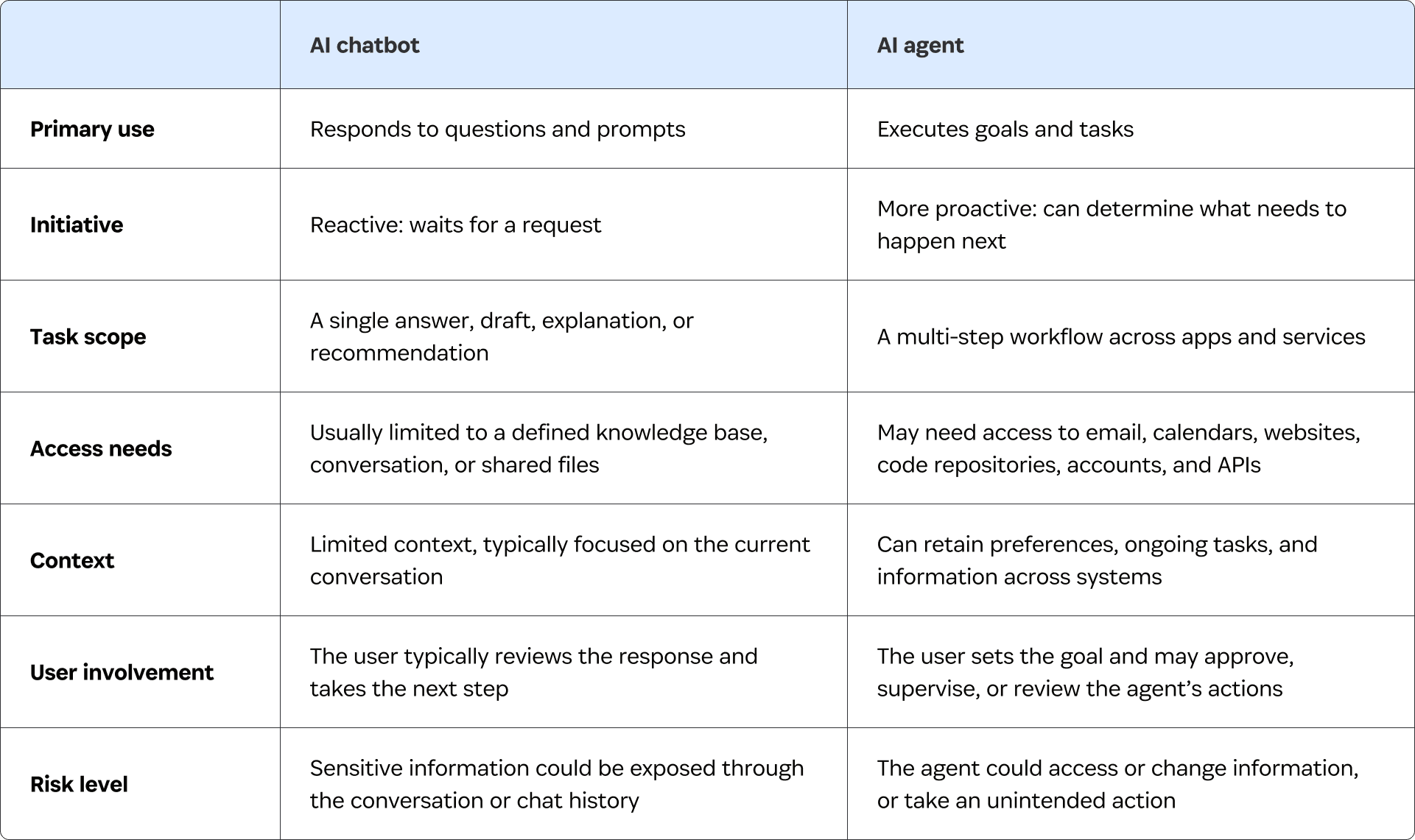
For those who are curious or apprehensive about using AI agents, or who are just hoping to understand how they work, read on for an overview of the uses, needs, and respective risks of both AI chatbots and AI agents.
Uses: responding versus acting
There are different kinds of AI chatbots, like the ones purpose-built to handle tasks like customer service, but broadly speaking, consumer chatbots are useful for reactive tasks. The chatbot can respond to your requests and questions, but without a specific prompt or ask from you, it won’t proactively do anything beyond that set task or beyond the scope of its existing knowledge-base.
AI Agents, however, operate very differently, and can do a lot more proactive tasks. Most agents will use a chatbot interface, but that’s just the beginning. With an agent, you ask it a question or assign it a task, and the agent itself will plan out the best course of action. Most importantly, the agent can then execute on that plan.
For instance, AI coding agents, and “vibe coding,” can famously let people build and code through an agent. Whether you’re a developer or not, you can ask the agent to create an app that performs a specific task, and the agent will fill in the blanks in order to build and design that app without needing any particular oversight or guidance beyond your initial ask.
In terms of day-to-day tasks, an AI chatbot can help you write an email asking when your friends are available next week for game night.
The difference is that an AI agent can draft the email, and then send it out to your guest list. When your friends respond, the agent can find an appropriate time for everyone, create a calendar event, and send out the calendar invites. On the night of the get-together, it can even place an order for pizza and snacks.
Examples like this come with natural follow-up questions. For instance: “that sounds great, but wouldn’t the agent need to access my email, calendar, and Uber Eats account to do that?”
The short answer is “yes.” The more an AI can do on your behalf, the more access it may need to your accounts and information.
Access: predictable connections versus changing needs
An AI chatbot has a defined set of permissions. It has access to certain knowledge-repositories, and can then access your conversation and any other relevant information that you directly share with it, like a document or integration.
More importantly, chatbots typically have fairly consistent access requirements across their various use-cases. If a chatbot needs more information to answer a question or request, it might ask you to share that information with it, but it won’t take action beyond that to seek the information out.
An agent, however, may need access to several systems to complete a task, and those access needs will vary from task to task. Planning a vacation could involve your calendar, email, travel websites, or airline accounts. Building an app could require access to code repositories, development tools, cloud services, and API keys.
Personal assistants and coding agents become useful when they can finish the work in the real account or app where the work belongs. That means they eventually reach a sign-in or protected resource. To interface with those systems, the agent will need you to give it access to that system.
And the key question isn’t whether an agent is connected, but how it connects, and for how long?
Context: short-term conversations versus dynamic retention
Imagine: you’re several paragraphs into a conversation with an AI chatbot when you ask it to “draft an email to Melissa.” The chatbot asks you to clarify who Melissa is, even though you’d shared information about her at the beginning of the chat.
At an essential level, this happens because LLMs and AI tools work within context windows. That refers to the amount of information (measured in tokens) that the AI tool is capable of “thinking” about at any given time.
While specific context windows vary across platforms, it’s an essential truth that AI chatbots have much smaller context windows than AI agents do. When you start a new chat session, the chatbot can’t “remember” or consider anything from your previous chats. In a long enough conversation, it will even “forget” information that you shared earlier in the conversation.
With AI agents, context works very differently. As Salesforce puts it, “...agents rely on persistent memory…Unlike one-off interactions, agents need to remember user preferences and ongoing tasks to accurately help customers.”
Agents can store context for longer periods and use it far more dynamically. They can “remember” information you previously shared for separate tasks, and may even draw on information from the other services you’ve given them access to.
Risk: leaked information vs unintended action
To summarize:
AI agents typically need far more access to your information and accounts than AI chatbots do.
AI agents store and use your information in far longer context windows, in more varied ways, and for longer periods of time.
AI agents are capable of taking proactive and complex action across different systems, without requiring an explicit command or oversight from the user.
All of these factors contribute to one of the most drastic distinctions between AI chatbots and AI agents: the level of risk they pose to your information.
AI chatbots are not without risk. Certainly you shouldn’t share any sensitive information like credentials within a chat window, to reduce the risk of that information being leaked from your chat history.
AI agent risk, however, is far less simple to handle. Unlike chatbots, agents require access to your accounts and sensitive information in order to help you effectively. But agents are also able to use that information and access in ways you didn’t intend. That’s why you need a clear moment requiring human approval to control when and how an agent can safely access your accounts.
How to use AI agents safely
When an agent first reaches a sign-in page that it can’t access, it asks you for the credential to sign in. At this point, you can either:
Manually enter your sign-in information every time the agent needs it, which somewhat defeats the purpose of a tool that relies on convenience and automation.
Paste your password into a prompt, which means allowing the agent to have access to your credential and account, potentially beyond the task at hand.
Neither of those options is acceptable.
With the 1Password for Agents platform, 1Password integrates with AI agents like Muse, from Meta, SpaceXSI Grok Bot, Instinct, and Town. When you ask an agent to complete a task, it has to follow a certain process:
The agent reaches a sign-in page and requests a specific login.
1Password shows you what the agent is asking for and which saved login could help.
You approve or deny the request.
If you approve, 1Password fills the password or one-time code directly into the destination.
The agent keeps working without seeing the password or the rest of your vault.
Your credentials and secrets stay secure and out of the agent’s context, while letting your agent continue to get things done.
Want to learn more?
To learn more about agentic AI, and how to use it securely, explore 1Password’s personal agent integrations.