


Extending identity security beyond SSO and PAM
Table of contents
The reality of modern security stacks
The gap: What traditional tools don’t fully cover
Where 1Password Enterprise Password Manager (EPM) fits
What makes EPM different from browser-based or consumer password managers?
How 1Password works with your existing stack (SSO, PAM, SIEM, developer and cloud tools, etc.)
Why this matters for organizations
The reality of modern security stacks
Most IT and security teams have established a strong baseline: a centralized identity provider (IdP) to enforce Single Sign-On (SSO) and Multi-Factor Authentication (MFA), endpoint protection to secure devices, and in many cases Privileged Access Management (PAM) to govern elevated access. These controls form a critical foundation for modern security programs, reducing attack surface, strengthening authentication, and protecting high-risk super admin accounts, and they generally operate as intended.
The challenge is that the environment around those tools has changed. Modern work has created more apps, more identities, and more ways to sign in than traditional identity controls were built to cover.
Today’s reality looks like this:
SaaS and AI sprawl: Teams adopt tools faster than IT can evaluate, approve, and federate. Shadow IT becomes normal, and the “official” stack is rarely the full stack.
More identity types: Access is no longer only “employee to app.” It includes contractors, shared accounts, service accounts, automation, and AI agents that need governed access to credentials and data. Even in mature environments, credentials remain one of the most exploited attack paths.
More access paths: Users sign in from personal browsers, unmanaged devices, unmanaged apps, and build pipelines. That creates more places for credentials to live, leak, and get reused.
This is what creates the Access-Trust Gap: you may have strong controls for the apps and users you can see, but modern work introduces a long tail of identities, apps, and credentials that sit outside those controls. People will still get work done, but they do it through workarounds that increase risk and reduce audit confidence.

The gap: What traditional tools don’t fully cover
SSO, IAM, and PAM are essential, but each is designed for specific access models. The issue is not that these tools fail. It is that they were not built to govern every credential and access scenario in a SaaS-forward, AI-powered organization.
Where the gaps show up most often:
SSO coverage ends at federation. Many apps are never federated due to time and complexity, lack of SAML/OIDC support, business teams buying tools directly, or competing priorities. If an app is not in SSO, you still need a secure way to manage access to it.
IAM can see accounts, but not credential behavior. IAM may tell you who has access, but it often cannot tell you whether credentials are weak, reused, stored in browsers, or shared informally across a team.
PAM is often too heavy for everyday access. PAM is best for high-risk systems and privileged sessions. But many day-to-day access needs do not fit that model, especially for SaaS admin accounts, shared vendor logins, and “someone needs access right now” situations. When tooling feels heavy, people bypass it.
The result is a familiar pattern: an organization can have “good” identity controls and still have unmanaged credentials living in browsers, spreadsheets, chat threads, and shared inboxes. That is where risk accumulates, and it is often where audits and incident investigations get painful.
Where 1Password Enterprise Password Manager (EPM) fits
1Password Enterprise Password Manager (EPM) is the credential security layer that extends identity security to the access paths your IdP and PAM cannot fully cover.
Unlike consumer password managers or lightweight vault tools, EPM operates as a governed extension of your identity architecture. It enforces centralized policy, integrates with your IdP lifecycle through SSO and SCIM, provides audit-ready telemetry to your SIEM, and supports both human and machine credentials. This shifts credential management from user convenience to enterprise control. It closes the credential gaps those tools leave behind, without forcing teams to redesign their identity architecture.
EPM helps secure:
The long tail of apps outside SSO: EPM protects sign-ins to the apps that are not federated today, cannot be federated, or will never be prioritized for federation.
Shared and team-based access: EPM makes it safe to share credentials while keeping individual accountability and auditability.
Non-human and machine credentials: EPM secures API keys, service accounts, tokens, CI CD secrets, automation workflows, and AI agents. It gives security teams centralized policy and auditability without forcing developers into complex, ticket driven PAM workflows.
Developer and DevOps access: EPM simplifies secure access to infrastructure, cloud consoles, databases, and internal tools used by engineering teams. Instead of introducing heavyweight privileged access workflows, it embeds governed credential management into the tools and processes developers already use, reducing friction while maintaining enterprise control.
Credential governance at scale: EPM replaces ad hoc credential storage and sharing with centralized controls, consistent policies, and measurable hygiene.
Put simply: your IdP governs identities and federated access. PAM governs the highest-risk privileged sessions. EPM governs the credentials in between, across everyday workflows, SaaS apps, and modern automation that traditional tools do not fully reach.
What makes EPM different from browser-based or consumer password managers?
Unlike consumer password managers or lightweight team vault tools, 1Password Enterprise Password Manager operates as a governed extension of your identity architecture.
EPM integrates with your IdP to enforce SSO and MFA, aligns with lifecycle processes through automated provisioning and deprovisioning, and applies centralized policies to how credentials are created, stored, and shared. It provides named accountability for shared access, detailed audit trails, and event visibility that can integrate with your SIEM and security operations workflows.
Beyond human logins, EPM also supports API keys, tokens, and other non-human credentials. In other words, extending governance to automation, CI/CD pipelines, and emerging AI-driven workflows.
The result is not just password storage, but enterprise-grade credential governance that supports least privilege, audit readiness, and Zero Trust maturity.
How 1Password works with your existing stack (SSO, PAM, SIEM, developer and cloud tools, etc.)
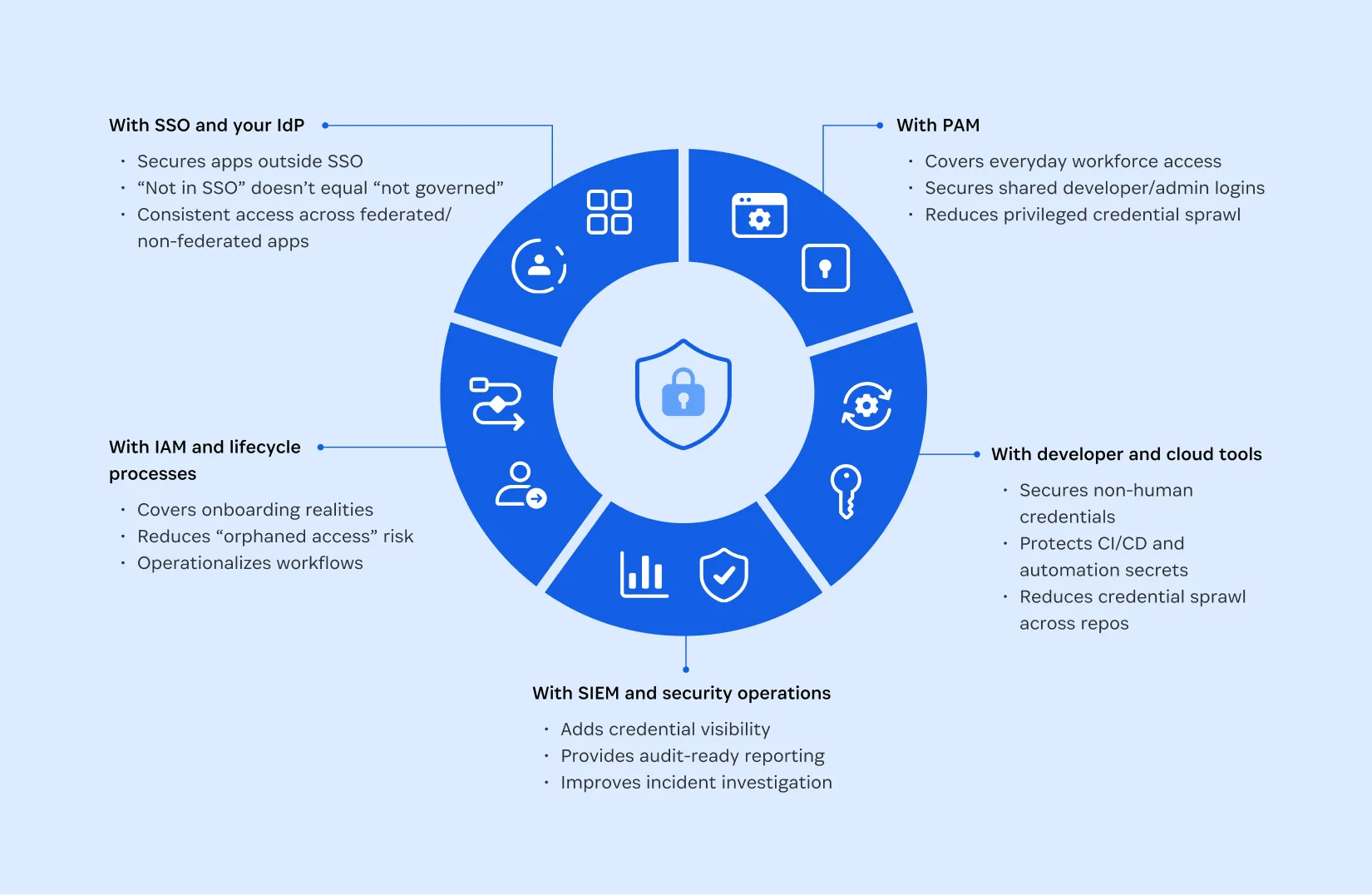
EPM is designed to fit into modern security stacks as a complementary layer. It helps teams increase coverage and reduce credential risk while maximizing the value of tools they already own.
With SSO and your IdP
EPM secures access to apps that sit outside SSO, so “not in SSO” does not equal “not governed.”
It reduces pressure to rush federation projects just to eliminate password risk.
It provides a consistent access experience across federated and non-federated apps, which reduces workarounds.
With IAM and lifecycle processes
EPM further supports onboarding and offboarding realities for apps that do not live in the IdP.
It reduces “orphaned access” risk when shared credentials outlive role changes or offboarding.
It helps operationalize access workflows without adding manual overhead.
With PAM
EPM complements PAM by covering everyday access scenarios where PAM is often too heavy or complex.
It secures shared admin and developer credentials, vendor accounts, and operational logins that still require control and accountability.
It helps reduce privileged credential sprawl by keeping PAM focused on the highest-risk systems, while still shrinking overall exposure.
With SIEM and security operations
EPM adds credential-focused visibility many stacks lack.
It provides audit-ready reporting and accountability for shared access.
It offers better investigation context when incidents involve compromised credentials or suspicious access patterns.
With developer and cloud tools
EPM supports modern build and cloud environments where credentials are not only used by people.
It helps secure secrets, tokens, and infrastructure credentials that power CI/CD and automation.
It reduces credential sprawl across repos, scripts, tickets, and shared documents.
It helps prepare for AI agents workflows that require governed access to credentials and data.
Why this matters for organizations
Credential gaps are not just a technical issue. They create real business risk, operational drag, and audit anxiety. EPM helps organizations improve security outcomes while also improving how work gets done.
Security outcomes
Reduced exposure to credential-based attacks by strengthening how credentials are created, stored, shared, and used.
Fewer unmanaged credentials living in browsers and informal channels.
Stronger accountability and auditability for shared access.
Better readiness for the AI era where tokens, automation, and machine identities expand the identity perimeter.
Business outcomes
Faster access without risky workarounds that slow teams down later.
Less IT burden from password resets, access requests, and shared-login chaos.
More consistent governance across the long tail of apps, even when SSO coverage is incomplete.
More confidence in audits without requiring more tools or more headcount.
EPM helps shift the conversation from “Are we adding another tool?” to “Are we extending coverage to the gaps our current tools do not address?”

When teams typically add EPM
Teams usually adopt EPM when they recognize a recurring pattern: they have invested in identity and access controls, but credential risk still shows up outside those controls.
“We have SSO, but not everything is covered”
Many apps are not federated and may never be.
EPM secures access to non-SSO apps so identity security does not stop at the IdP boundary.
It lets teams improve coverage immediately while continuing to mature their SSO roadmap.
“Passwords are still saved in browsers”
Browser storage is convenient, but it is not governance.
EPM replaces browser-based credential sprawl with centralized storage, controls, and policy enforcement.
It standardizes secure behavior across devices and browsers, reducing reuse and accidental leakage.
“We’re sharing credentials we shouldn’t be”
Shared credentials are common, especially for SaaS admin accounts, vendor portals, and team tools.
EPM enables secure sharing with the right access controls and auditability.
It replaces risky sharing behaviors like spreadsheets, chat messages, and shared inboxes.
“PAM feels heavy for everyday access”
PAM is powerful, but many day-to-day access needs do not fit a high-friction privileged session model.
EPM provides a lightweight, user-friendly way to secure everyday privileged credentials.
It reduces the likelihood that teams bypass controls just to keep work moving.
“We lack visibility into credential hygiene”
If you cannot see weak, reused, or shared credentials, you cannot reduce the risk.
EPM makes credential hygiene visible and governable, so teams can measure improvement over time.
This often becomes a key driver for internal alignment because it translates credential risk into concrete, actionable insight.
Organizations have invested heavily in identity, SSO, and privileged access. But, attackers continue to exploit the credentials that live outside those controls. The question is no longer whether you have identity tools in place, but whether they fully reflect how modern work actually happens. 1Password Enterprise Password Manager extends governance to the long tail of apps, shared access, and automation that traditional tools cannot fully reach. It reduces risk, strengthens audit confidence, and enables teams to move faster without sacrificing control.