
How to govern developer secrets and AI agent credentials without breaking your pipeline
Securing credentials is a top concern as organizations adopt AI agents alongside established developer workflows. Developers, AI agents, and automated workloads need credentials to build and operate software, but development and delivery workflows can leave those credentials copied onto local devices or stored across CI/CD systems and production environments. Without consistent controls to scope access, secure credentials, and deliver them at runtime, security can become a source of friction in the workflows developers rely on to deliver software.
This guide shows administrators how to find exposed credentials, secure and organize them, and deliver them at runtime without slowing delivery.
In 1Password’s Developer Pulse survey, 65% of developers said they were expected or encouraged to use AI agents, while only 33% said they have a secure way to do so.
Developer secrets and AI-agent credentials can look like separate issues but they create the same problems. When credentials sit outside of managed vaults, remain active longer than necessary, or cannot be traced to a person, agent, or workload identity they introduce the same access risks. Both pose friction when security controls interrupt the tools and workflows developers need to deliver software.
To secure developer secrets and AI-agent credentials, administrators need a solution that can discover exposed credentials, secure them in a controlled secrets environment, and deliver approved access to developers, AI tools, and automated workloads at runtime without writing plaintext values back to disk.
This guide explores why developer secrets and AI-agent credentials belong in the same governance process, what a credible solution needs to provide, and how 1Password 1Password puts those requirements into practice.
Developer secrets and AI-agent credentials need the same governance controls
Developers, pipelines, and AI agents all rely on credentials, yet those credentials are often stored or used outside approved systems and delivery workflows. A developer may put a database password in a .env file, while an engineer may give an AI agent a broad API key to avoid repeated authorization failures.
Manual cleanup can address isolated findings, but AI agents create and use credentials across tasks at machine speed. That sprawl cannot be managed by hand; it has to be governed as part of the workflow.
Among developers who use AI agents, 33% report that their organization has experienced a security incident or breach from overprivileged non-human identities, and 40% grant agents persistent access to systems or credentials. Simultaneously, developer secret sprawl is growing in public repositories. GitGuardian detected 28.65 million new secrets in public GitHub commits in 2025, a 34% increase in a single year.
These are not separate governance problems because credentials cross boundaries. A developer may use an API key locally, the same key may be copied into a pipeline variable, and an AI agent may inherit it from the developer’s shell or the workload running it. When access for human and non-human identities is managed separately, administrators may see only part of the picture. They cannot reliably trace where a credential is stored, who or what uses it, or what systems and data it can access.
Closing that gap requires a secrets management operating model that governs the credentials used by developers, AI agents, and automated workloads. The model must provide defined scope, managed lifecycles, clear attribution, and workflows teams will use. It puts those requirements into practice through three phases: find exposed credentials, secure and organize them, and deliver approved access at runtime.
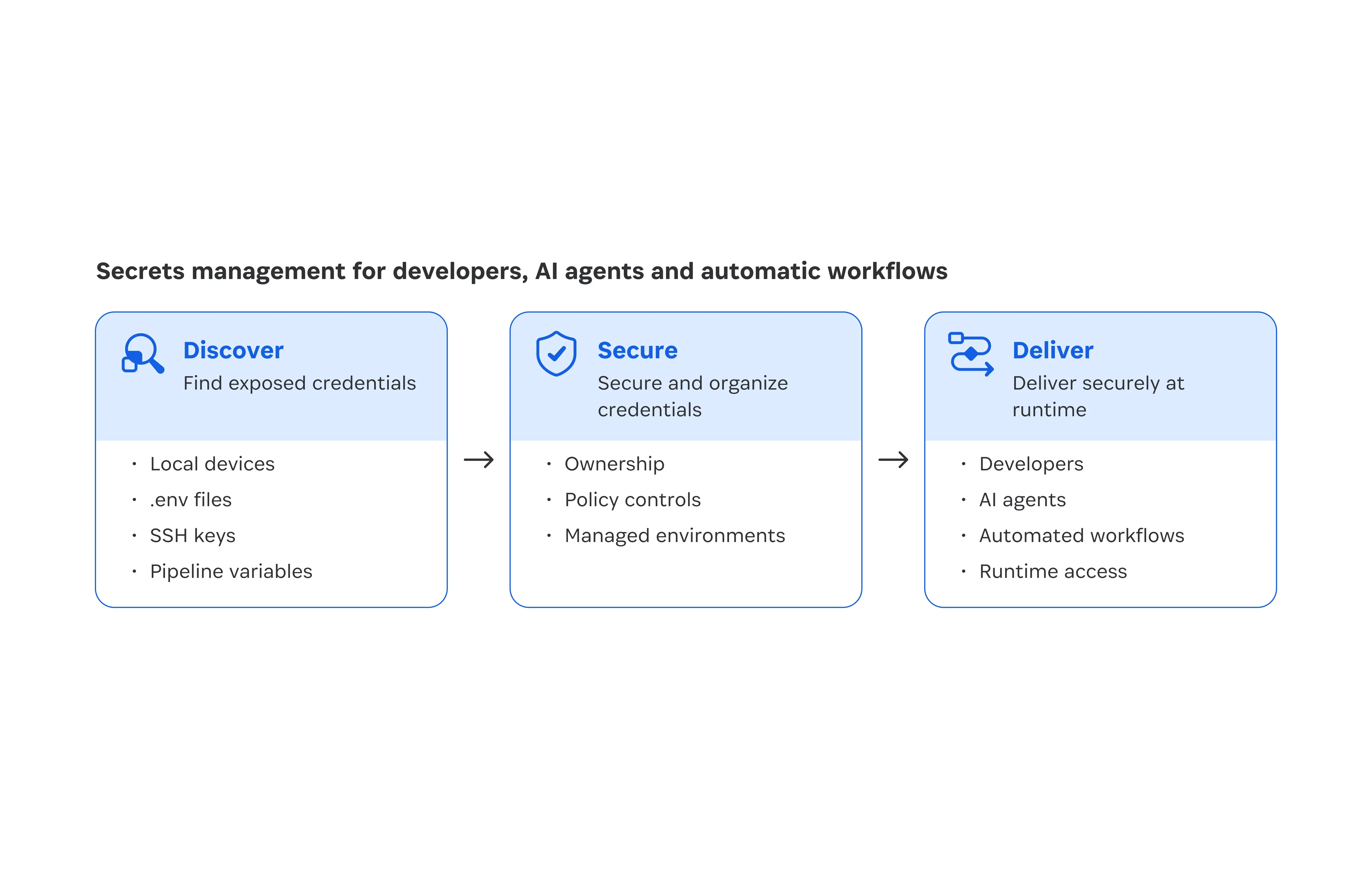
Find exposed credentials before they become an incident
Central management of production credentials does not prevent developers from copying them into local development files. A developer may copy a production database password into a local .env file, save an SSH private key in the laptop’s .ssh directory, or place an API token in a project configuration file. The original credential remains centrally managed while the copy sits outside that control.
Rather than relying on developers to remember and inventory the scattered secrets they use, administrators should lead the discovery process while developers remediate findings. 1Password Developer Watchtower gives administrators visibility through a consent-based scan of local, enrolled developer devices for .env files and SSH keys. It reports each finding without exposing the secret itself, so administrators see the file path, credential type, and device, never the value.
When Developer Watchtower identifies an exposed credential, the administrator can notify the owner with the file location and provide remediation instructions. Developer Watchtower directs the developer to import the secret into a new or existing 1Password Environment and remove the original .env file from the local disk. Developers can continue receiving the environment variables their applications expect, while the credential moves into a secure place to store, share, and use application secrets.
The local disk exposure report gives administrators a persistent record of findings across enrolled devices. It shows the file path, credential type, device, and mitigation status, so administrators can identify unresolved exposure, track remediation over time, and give leadership a concrete view of where credential sprawl exists and whether it is declining.
Secure and organize discovered credentials
Once an exposed credential is identified, administrators need a governed place to assign ownership, control who can access or update it, share access with the people or groups responsible for the application, and revoke access when the work ends. 1Password Environments provides that place. Teams can share an Environment with the right people or groups, while administrator-defined policies control who can access or update its secrets and how that access changes over time.
A 1Password Environment is a project-specific collection of environment variables and credentials. Teams can organize secrets by application, by service or dependency, or by development stage. Organizing by application keeps the credentials needed by one application together. Organizing by service or dependency groups credentials for systems such as databases, cloud services, or third-party APIs. Organizing by stage keeps credentials separate across development, staging, and production workflows. This helps teams give the right people and workloads access to the credentials they need without granting broader access than necessary.
Centralized secrets management changes how credentials are governed, not how developers work or how applications receive configuration. Developers and delivery systems can continue using familiar environment variables, commands, and pipelines, while 1Password Environments stores and governs the underlying credentials. For AWS workloads, teams can sync Environment variables from 1Password Environments to AWS Secrets Manager, so applications can continue retrieving them through AWS without teams manually updating separate copies.
The next section explains how approved developers, AI coding tools, and automated workloads receive those credentials at runtime without writing plaintext back to disk.
Deliver credentials securely at runtime
Once credentials are secured and organized, they need to be delivered securely at runtime to developers, AI agents, and automated workloads. The delivery path differs because developers run applications interactively under their own identity, while AI agents and automated workloads receive scoped runtime access tied to the identity making the request.
Developers
For developers, runtime access begins when a local application needs credentials to run. 1Password supports secure runtime access through virtual .env mounts, the 1Password CLI, and SDK integrations.
Virtual .env mounts make secrets from a 1Password Environment available to an application in the .env format it needs.
The 1Password CLI, a command-line tool, lets developers inject Environment variables into a command at runtime, giving administrators a consistent access path for command-line workflows.
The 1Password SDKs, software libraries for application integration, let application code retrieve Environment variables programmatically, giving teams a way to integrate managed credential access into the application.
AI agents and automated workloads
For AI agents and automated workloads, runtime access begins when an automated process needs credentials to perform a task. 1Password supports AI coding tools through the MCP Server and Agent Hooks, and automated workloads through Credential Broker and Service Accounts.
Credential Broker ties runtime access to an AI agent's or automated workload's identity. It delivers approved credentials with scoped, time-limited access and records the access event for review.
The 1Password MCP Server connects an AI coding tool to an Environment and creates a local .env mount containing the Environment variables approved for the workflow. This gives administrators a defined access path for AI-assisted development.
Agent Hooks run before an AI coding tool executes a shell command. They check that the required .env mount is available and can stop the command if it is not.
1Password Service Accounts give CI/CD pipelines and other automated workflows scoped access to the Environments they need. Because that access is separate from an employee account, administrators can manage it independently.
These capabilities are available through integrations with leading AI coding tools and agent runtimes. For example, Cursor uses 1Password Agent Hooks to validate Environments-backed .env files before the agent runs commands, while Kiro and OpenAI Codex connect to 1Password Environments through the local MCP Server. NVIDIA OpenShell provides a secure runtime for autonomous agents, giving them scoped, time-limited access to approved systems without exposing real credentials in the agent’s context. In each case, the underlying credential values remain managed by 1Password, while the partner tool or runtime controls how the agent uses the approved access.
Start with a secrets management foundation, then expand governance
In 1Password’s research, only 5% of IT and Security professionals said they needed nothing else to feel confident expanding their use of agents. The remaining 95% identified security improvements that would increase their confidence. 1Password gives administrators a practical way to build that confidence, starting with one team, application, or pipeline.
Start with Developer Watchtower to identify supported developer secrets exposed on local devices. Use 1Password Environments to secure and organize them by application, service, or stage, establish access, and assign ownership.
For developer administrators, this creates an early, visible outcome: reduced credential exposure, clearer ownership, and a secrets management process operating in practice. For Engineering and Security leadership, it provides evidence they can evaluate: what changed, which credentials remain unresolved, and whether the governed access path fits existing delivery workflows.
For each pilot, define success as an inventory of exposed credentials, a managed destination for the credentials that remain in use, assigned access ownership, and a remediation path for unresolved findings.
Then extend the same governance model to AI coding tools and automated workloads. Use MCP Server and Agent Hooks for supported AI-assisted development. Use Service Accounts for automated workflows, and Credential Broker when runtime access should be tied to an agent or workload identity and delivered with scoped, attributable access.
1Password’s developer security capabilities help teams expand this model through an incremental rollout. Developers can continue using familiar application and pipeline interfaces, while administrators gain a consistent way to apply the Scope, Lifecycle, Attribution, and Adoption framework across the credentials those workflows use.