The 1Password Environments MCP Server is now on Cursor Marketplace

by Dennis Kromhout van der Meer and Scott Lougheed
July 30, 2026 - 4 min

Related Categories
AI coding agents such as Cursor are becoming an integral part of software development. They help developers set up projects, write code, and run tasks, but the applications developers build still need credentials to connect to APIs, databases, and other services. 1Password Environments gives developers a secure way to manage those credentials, while the 1Password Environments MCP Server lets Cursor help manage project environments without returning secret values.
Developers can ask Cursor to scan a codebase for potential secret exposure and identify hard-coded credentials. They can then move those credentials into 1Password and rotate any values that may have been exposed during the process.
Expanding into Cursor Marketplace
Cursor is a multi-modal AI coding platform that helps developers build software across complex codebases. It allows developers to use an agent for complex coding tasks involving production APIs, services, and infrastructure.
The 1Password Environments MCP Server brings 1Password’s secrets management into Cursor. It lets agents help developers manage project environments and use secrets for their workflows while sensitive values remain securely managed in 1Password. The MCP server does not return secret values.
The existing 1Password plugin on Cursor Marketplace now makes 1Password Environments capabilities, including the MCP Server, available directly through Cursor. This is the same MCP server available to developers using other supported MCP clients. This integration makes it easier for Cursor developers to discover and configure 1Password directly from their workflows.
How the 1Password Environments MCP Server works
Here's what happens when a developer asks Cursor to support their workflows:
Start a task in Cursor: For example, ask Cursor to create an app and configure the environment it needs.
Cursor connects to the 1Password Environments MCP Server: The connection lets Cursor discover and invoke the available MCP tools.
Cursor creates and manages the Environment: Cursor can create Environments, list and manage variable names, and prepare project configuration. The MCP server does not return secret values.
Applications use secrets managed in 1Password: Developers can use Cursor to configure and troubleshoot application access while the required secrets remain managed in 1Password. Access remains governed through the 1Password desktop application, while centralized credential management stays intact.
Currently available for macOS and Linux only.
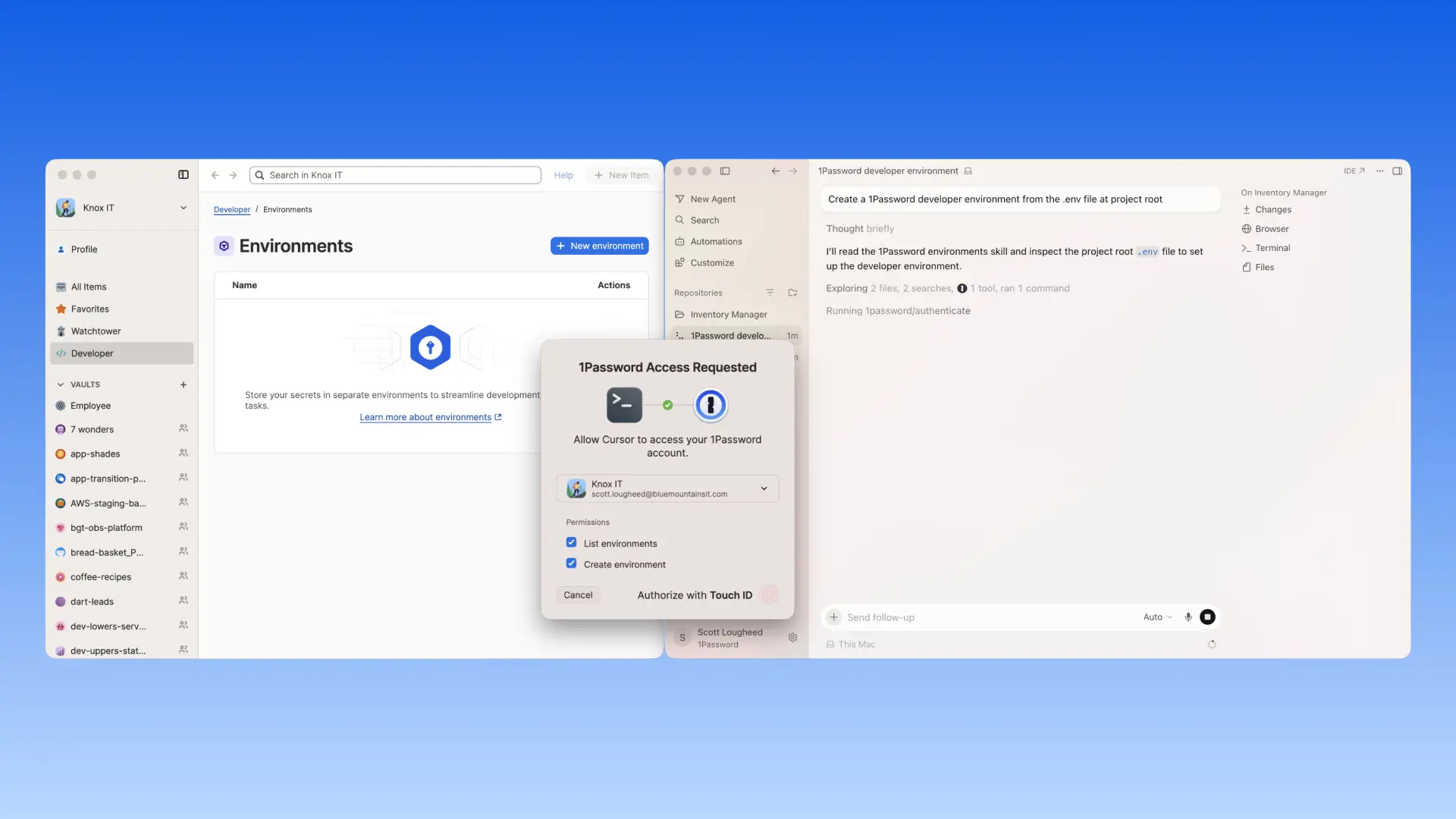
When an application needs configured values, 1Password can make them available through a locally mounted .env file without writing values to disk. Sensitive values remain securely managed in 1Password throughout the workflow. The MCP server does not return secret values.
AI agents are moving from suggesting code to operating inside the development workflow. The security question is not whether they can help, but what they can access and where credentials live. By making 1Password Environments natively available through Cursor Agent, developers can move plaintext .env values into 1Password, manage the Environment from Cursor, and let applications receive those values while they stay secure in 1Password. Once a secret is in 1Password, the MCP server returns names, not values. That is the boundary developers should be able to trust.”
-Nancy Wang, CTO at 1Password
When agents are running code against production APIs and real infrastructure, security can't be bolted on afterward. The Cursor Marketplace exists to give developers the tools they need to build confidently with AI, and that includes getting the security layer right. With the 1Password Environments MCP Server, developers can manage workflows and application secrets through 1Password directly, allowing developers using Cursor to move fast without creating risk for their teams."
-Travis McPeak, Security at Cursor
Get started with the 1Password Environments MCP Server
Cursor Marketplace joins the growing list of places where developers can find the 1Password Environments MCP Server, with more to come. Each AI-native platform 1Password expands into is another proof point for a broader principle: agents should get only the access they need, while sensitive values remain protected. As more AI-native development tools become central to how software gets built, 1Password will continue to meet developers where they are.
For developers using Cursor and 1Password
Explore our documentation to configure the MCP server and start building securely with Cursor today. Find the 1Password Environments MCP Server on 1Password Marketplace and on Cursor Marketplace to add it to your Cursor workflows. You will need a 1Password account with access to 1Password Developer Tools.
New to 1Password? Start a free trial to get access to 1Password Password Manager, 1Password Environments, and the 1Password Environments MCP Server.
If you’re looking for a way to give AI agents and machine workloads access without creating standing credentials, the 1Password Unified Access Platform brings together Credential Broker and 1Password Privileged Access. Credential Broker authenticates requesters before delivering approved credentials, while Privileged Access governs just-in-time, just-enough access in destination systems.
Explore the 1Password Unified Access Platform and read about the Credential Broker public preview.