From Jira to PR: How we built agent-driven pipelines for design system changes
by Nancy Wang, Wayne Duso, Katie Davis, Matt Davey
May 19, 2026 - 11 min

Related Categories
Design system work follows a well-defined loop: read the ticket, check the Figma spec, find the right component primitives, apply the right tokens, write the Storybook stories, run the tests, open the PR. The steps are consistent enough that when we looked at our design system backlog, we didn't just see a list of tasks; we saw a set of instructions waiting to be executed.
So we set an agent loose on the loop. At first, it was a semi-hot mess. But then we gave it the right context, and boom, it has completely changed how we improve our Design System.
Here’s our approach on what we did and what we learned.
Why we started with our design system
Every team considering agentic coding faces the same question of where to begin. The tempting answer is your largest codebase or your most complex feature. The right answer is wherever the work is most well-specified, and the feedback loop is fastest.
Our React component library, the web layer of our design system, happened to be both. Conventions are strict by design: that's the whole point of having a design system. The output shape is predictable and well-documented: a component, some design tokens, a story, and a test. The blast radius of any change is traceable. And if a token is wrong, the tests catch it automatically, without a human having to notice.
That combination of explicit conventions, predictable outputs, and automatic validation describes exactly the kind of bounded context where agents do well. When we looked at where to prove the pattern before adapting it to larger, messier codebases, the design system was an obvious answer.
What happened when we pointed a general-purpose agent at our design system
The first attempt was to take a well-scoped ticket, hand it to a capable coding agent, and see what comes out.
The results were instructive, and not in the way we hoped.
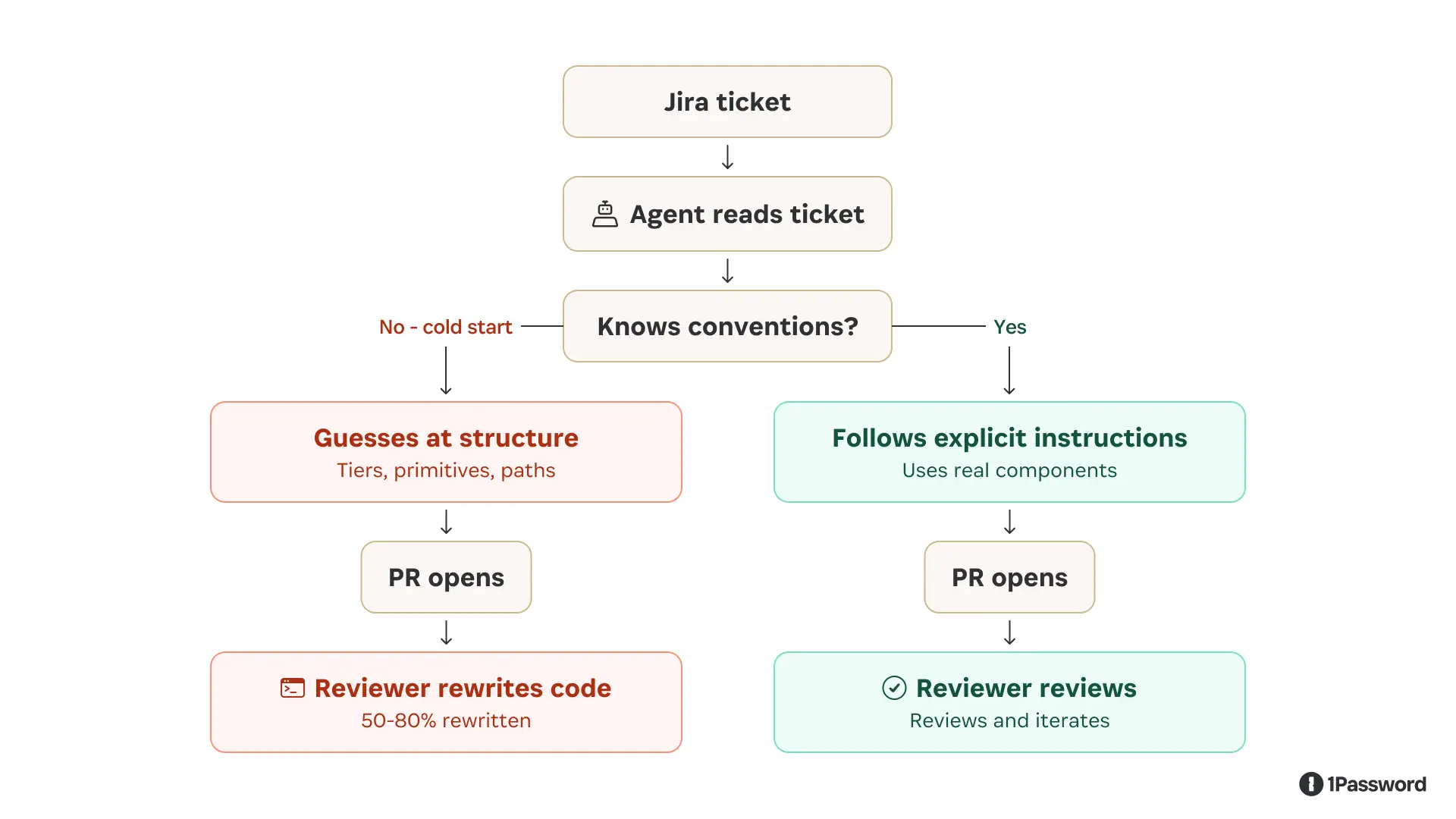
The agent could read the ticket and navigate the codebase. But without design system-specific context, it filled knowledge gaps with confident-sounding guesses.
It placed tokens at the wrong tier in the hierarchy. Reached for raw HTML elements instead of the correct component primitives. The agent often chose components that looked right in isolation but were semantically wrong for the system, the kind of inconsistency a developer would catch immediately because it breaks patterns that only make sense in the context of the product as a whole.
It opened PRs that didn't follow the team's merge template; the code was often compiled, and tests even passed, but the output wasn't idiomatic. It was close enough to look right yet different enough that a reviewer had to do substantial correction work before anything could merge.
We hadn't saved developer time by making it easier to open a PR; instead, we'd moved the work downstream.
Without institutional knowledge, the agent’s work was insufficient. It knew how to write React, but it didn't know how our design system writes React: the specific directory structure, the token tier model, the CI conventions, and the component primitives we use instead of raw elements. That knowledge lives in the heads of everyone who works on the system, not in any file the agent could easily read.
The fix: making tacit knowledge explicit with agent skills
The solution was to stop expecting the agent to infer what experienced contributors know implicitly and start encoding that knowledge as explicit, executable instructions.
We wrote a set of skills covering the core design system contributor workflows that included
Scaffolding a new component
Defining tokens
Writing Storybook stories
Adding icons across platforms
Opening a merge request
Debugging a CI failure
Tracing cross-platform impact from a token change
Each skill provides the agent with exact file paths, naming conventions, import patterns, and build commands to make them executable by our agent.
We also exposed Knox through MCP for consumer-facing workflows where agents don’t necessarily have the Knox repo available but still need authoritative guidance on components, design tokens, and interaction patterns. This gave agents a way to ask the design system what exists, how to use it, and which patterns are appropriate without relying on guesswork or outdated copied context.
We folded in our existing builder-facing documentation, including real examples from the product, so the agent could anchor its decisions in consistency. Instead of the agent inferring what's in the system by reading source files, it can ask our design system directly. Our MCP server also added documentation on the user’s intent and the problem a specific component would solve. It enabled the agent to not only make it visually correct but also function as the user would expect in the product UI.
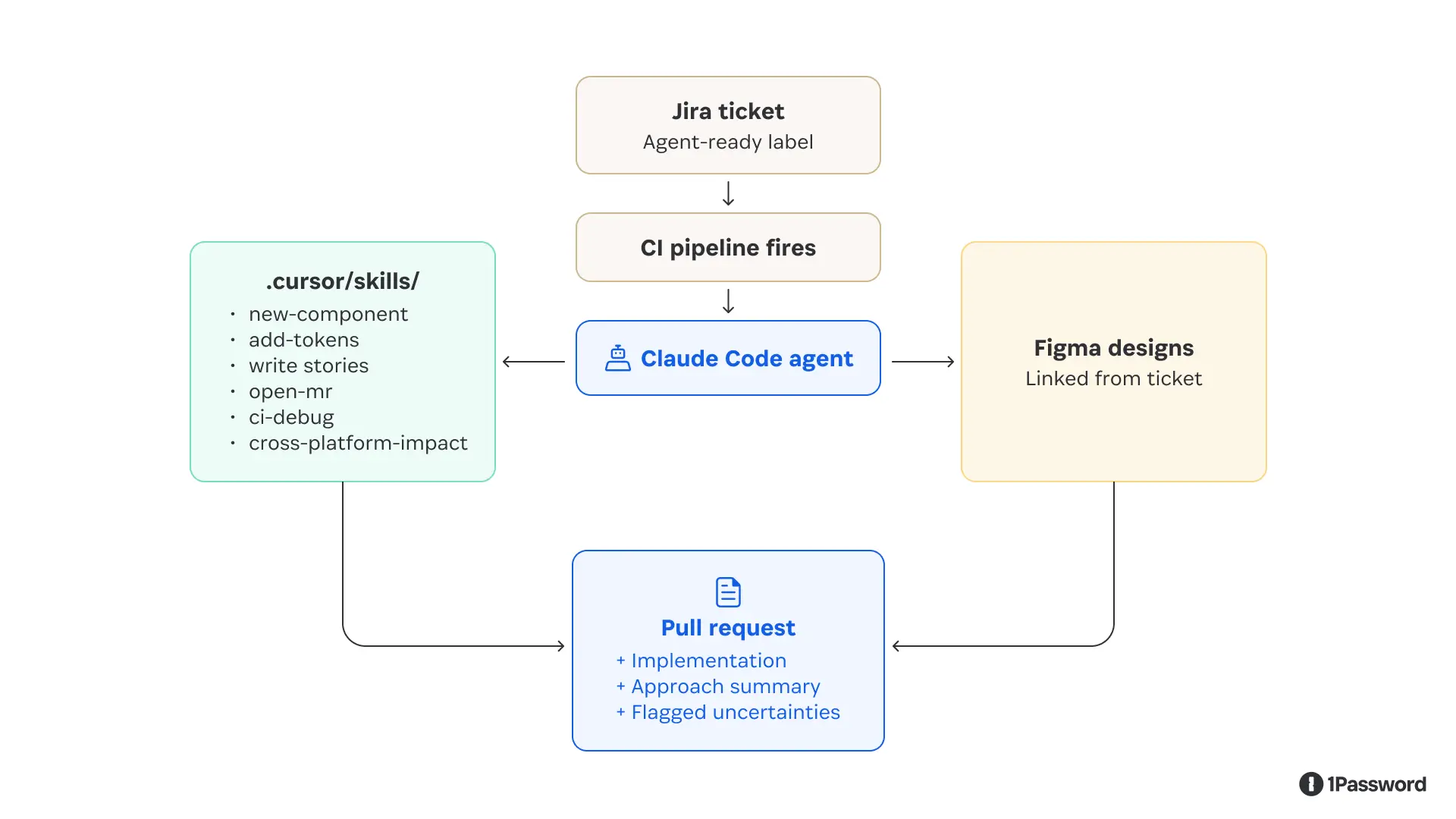
Right away, the agent’s output improved. It stopped guessing conventions because the repeated contributor workflows were now explicit. It had focused skills, clear commands, and a human-qualified ticket to work from.
How to do this for your own design system
This approach generalizes the specific tooling we used, a custom MCP server, CI-triggered runs, and skills committed to the repo can be adapted to any design system with enough test coverage and explicit conventions.
1. Pick the right starting scope
Don't start with your most common ticket type; start with the one you specify most often.
Good candidates:
Adding a component variant
Defining a new token tier
Updating an icon pipeline
Poor candidates:
Broad refactors
Anything that touches cross-team contracts
Work that requires design judgment
Tickets that the system doesn’t capture
A safe guide is that if a new contributor couldn't implement the ticket from the description alone, the agent can't either. The agent's output ceiling is the quality of its input.
2. Write skills, not documentation
Most design systems have documentation that defines what things are, but few have executable instructions written as skills, which tell an agent what to do, in what order, with exact commands.
Write a skill for each atomic workflow your contributors repeat. Keep them narrow; a skill that does one thing well is easier to maintain and easier for the agent to execute correctly than one that covers every case. Commit them to the repo alongside the code they describe, and when a convention changes, update the skill.
3. Match the context layer to the workflow
Agents working inside a well-structured repo can often read source files effectively when they have narrow skills that tell them where to look, what conventions to follow, and which commands to run. For the Jira-to-PR pipeline, the foundation was repo access, explicit skills, and CI review.
Not every agent workflow starts with a full design system repo available. Consumer-facing agents, prototyping tools, and downstream product workflows may still need authoritative guidance.
If your tooling supports MCP, a lightweight MCP server wrapping your component API, token registry, or Figma library data is the right answer. The agent queries it at runtime instead of guessing.
If a full MCP server is out of scope, a well-maintained DESIGN_SYSTEM.md context file that the agent loads at session start accomplishes most of the same goal at lower fidelity and is still significantly better than nothing.
4. Wire the trigger to a human qualification step
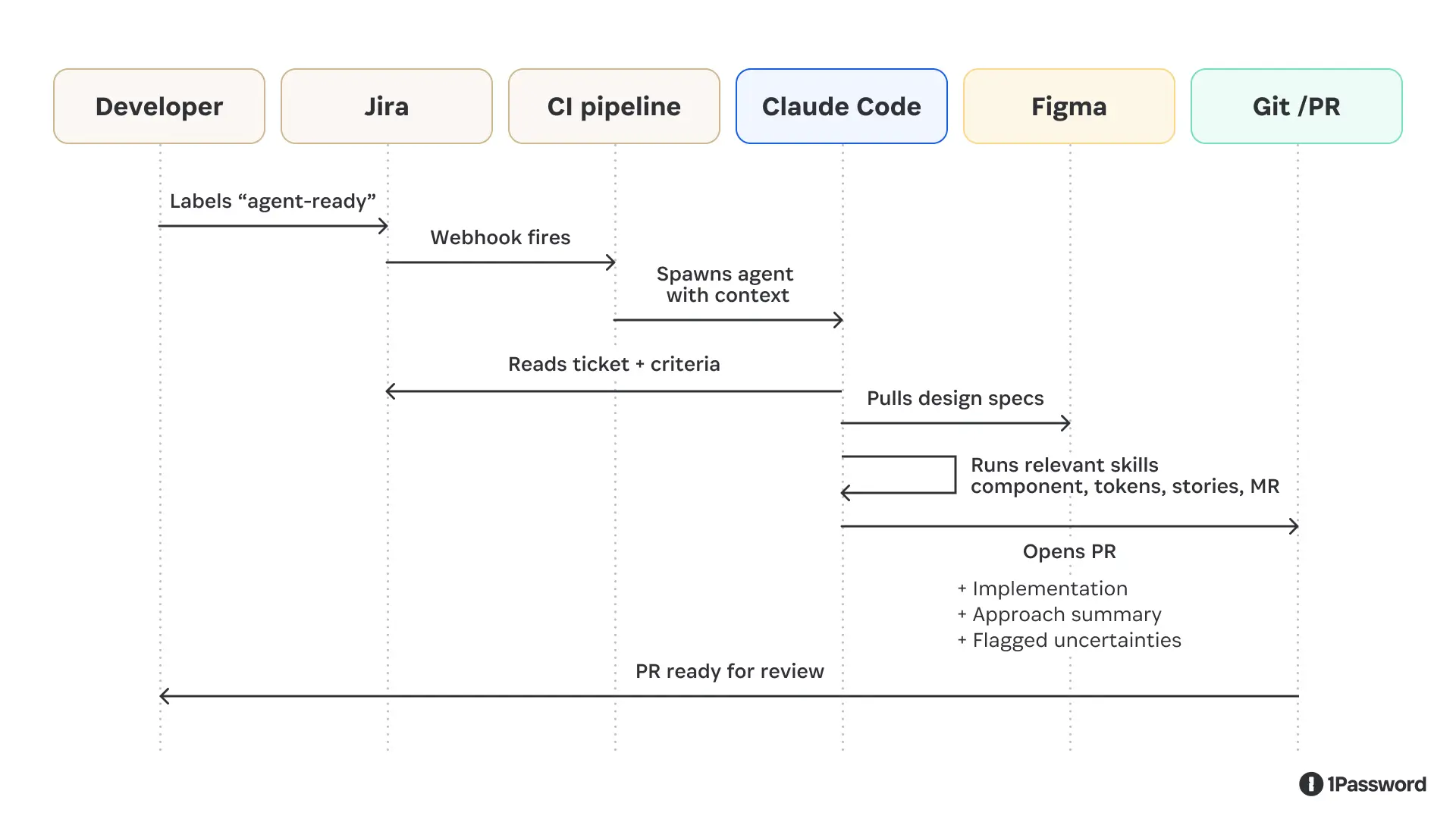
The best trigger we found was a ticket label.
A developer reviews the ticket, decides it's well-scoped, applies a label, and the pipeline fires. This keeps a human in the qualification loop while automating everything downstream.
5. Make the agent surface uncertainty
The PR description should explicitly name the decisions the agent wasn't confident about. A reviewer who knows exactly where to look can validate a draft in minutes, but a reviewer hunting for hidden assumptions will spend hours.
We asked the agent to flag uncertainties. For example, a PR that says "I wasn't sure whether this token belongs at the alias or component tier; I chose alias, but please verify" is far more useful than one that looks confident and buries the guess.
6. Measure PR quality before speed
Resist the temptation to lead with velocity metrics. The number that tells you whether the system is actually working is pull request quality.
Start with what percentage of agent PRs need only review and minor tweaks versus a substantial rewrite. A high rewrite rate means you've shifted work downstream, not eliminated it.
Component accuracy is a useful proxy. Does the agent reach for your actual design system primitives, or does it fall back to raw elements when it doesn't know what to use? If it's reaching for raw elements, your MCP context layer isn't working.
What the ticket-to-PR pipeline produces
In our workflow, a developer labels a ticket as ready. Then a few minutes later, a PR opens with idiomatic code, an approach summary, and explicit notes on where the agent was uncertain.
With this context, the reviewer's job becomes iteration, not inception. They're looking at a working draft with known uncertainties called out up front, not a blank editor.
The quality gap between "agent with skills and real design system context" versus "agent reading files cold" is large enough that it felt more like crossing a threshold than an incremental improvement.
Below the threshold, agents generate code that appears plausible but requires significant correction. Above it, they generate drafts that a reviewer can actually build on.
An unexpected outcome: design-led prototyping
While building the ticket-to-PR pipeline, another question came up: could we give designers the same setup our engineers use for rapid prototyping?
Using the MCP-backed Knox context, we built a prototype playground with prebuilt product templates, an agent to query components, and a simple slash command to scaffold a new prototype from scratch, integrating guidance directly into the user workflow.
A designer describes what they want to build or links to a Figma frame, and the agent generates a working interactive prototype using real design system components ready for iteration and feedback. They share it with a deploy link.
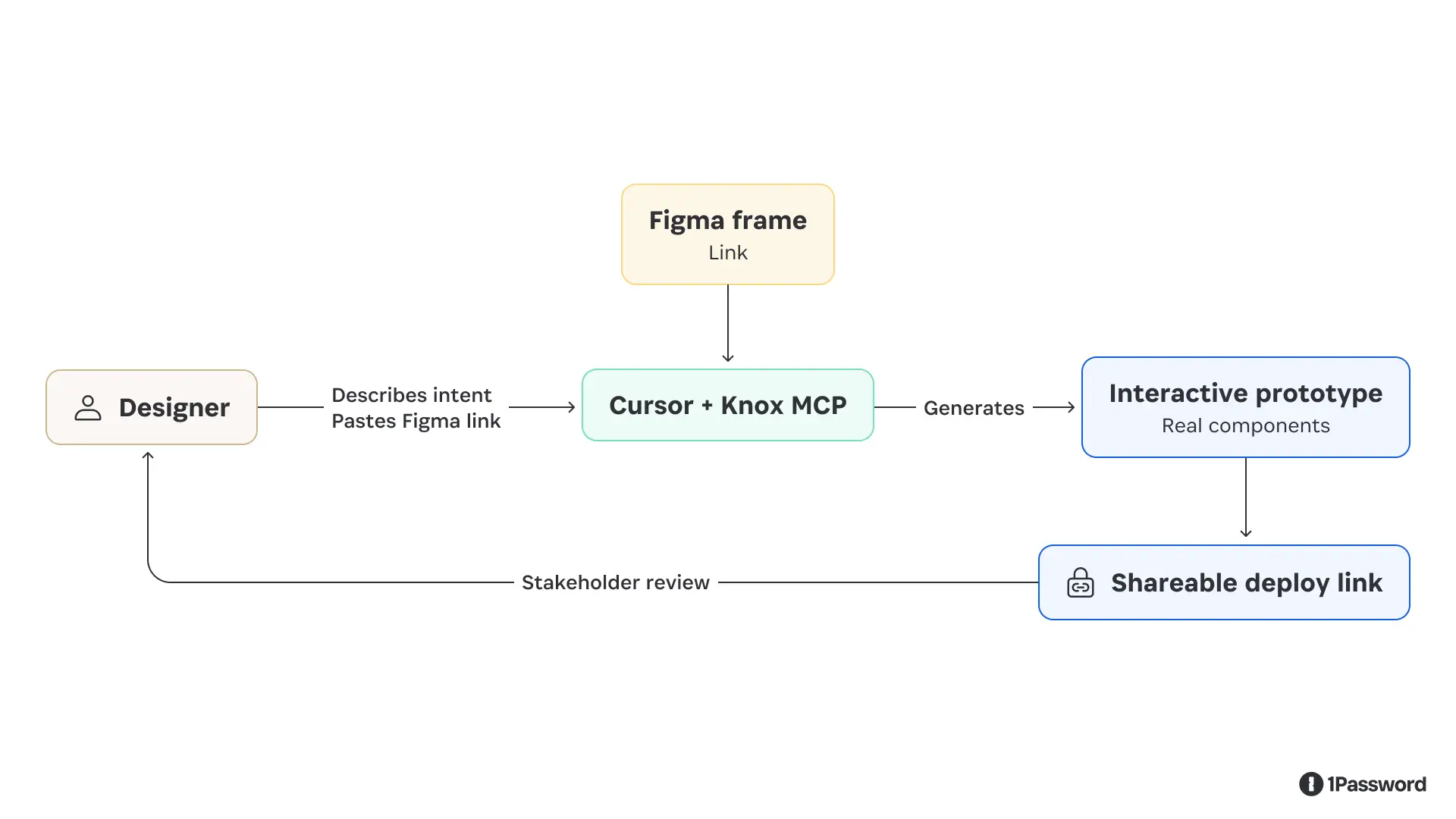
This changed a workflow that previously required developer time into something a designer could run on their own.
A stakeholder review that used to mean a static mockup or a time-consuming Figma clickthrough could now be a clickable prototype built with the actual component library, matching the product's fidelity and interactions.
A few things we learned here that we didn't expect:
Smaller tasks produce better results than large ones ("build the sidebar" before "build the entire dashboard")
Naming components specifically ("use the secondary neutral button") beats describing the desired appearance
Detailed Figma component annotations (size, padding, intended behavior, and states) translate directly into better agent output, because the agent reads that documentation the same way a developer would
What we'd do differently
Ticket quality is not automatable. The agent is a strong implementer of well-specified work and a poor interpreter of ambiguous requirements. The qualification step (a human deciding whether a ticket is genuinely ready) is the most important step in the pipeline, and it can't be delegated to the agent.
Start with the narrowest possible scope. Our early instinct was to write a single "implement a design system ticket" skill. What actually worked was breaking it into eight focused skills that the agent could compose as needed. Narrow skills are easier to maintain, easier to debug when something goes wrong, and easier for the agent to execute correctly.
Treat agent credentials the way you'd treat any machine credential. The design system MCP disconnects after a fixed window, making an agent credential that persists indefinitely a liability. Issuing short-lived, scoped access for agent workflows isn't a UX inconvenience. It's baseline security practice, and it's consistent with how you'd handle any other automated system that has access to your codebase.
Vercel’s design system tooling powers some of the most widely used component libraries in production. Andrew Qu has been tracking how teams are starting to embed agents directly into that layer:
"The gap between design and production has always lived in the component library, where intent either survives or gets lost in translation. With Generative UI, the component library stops being the end of the handoff and starts being the substrate the model renders from. When the model is grounded in what your components are and how they behave, it stops generating one-off UI and starts generating things that belong in your product.”
–Andrew Qu, Chief of Software, Vercel
Design system work will always require human judgment on the questions that influence your product. What's changed is the ratio of that judgment work to the implementation work that follows it.
Agents are increasingly handling the latter. The point is to free the people who understand the system to focus on the work that actually requires human judgment.

Subscribe to the 1Password Developer newsletter
Stay up to date with the latest 1Password Developer product news, industry insights, and community contributions. Plus, learn best practices for becoming a better, more secure developer – both at work and at home.